SIMOSA App Download Guide, Features, Jazz Account Management, Packages & More
Just Now
77.81
3.3.4.3
Android 6.0
300k+
Description
Managing a mobile connection becomes easier when you can check your balance, view internet usage, explore packages, and pay bills from one place. For Jazz customers in Pakistan, the SIMOSA App provides a convenient way to manage many everyday mobile services directly from a smartphone.
Instead of using separate methods for checking account information or searching for available offers, users can access supported services through the app. It is designed to help Jazz customers keep track of their mobile usage, explore bundles, recharge prepaid accounts, and manage eligible postpaid services.
Whether you use mobile internet for work, study, entertainment, or communication with family, understanding how SIMOSA App works can help you manage your connection more comfortably. This guide explains the main features, practical benefits, installation process, possible limitations, and important safety tips for new users.
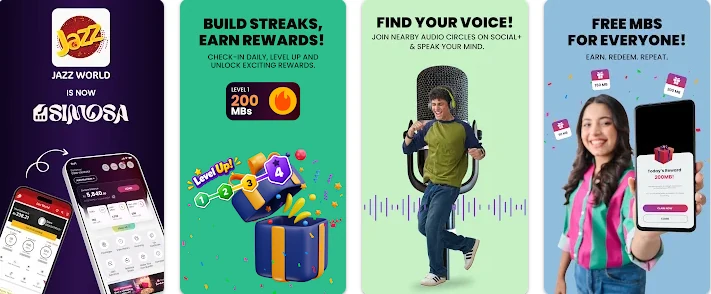
What Is the SIMOSA App?
SIMOSA App is a mobile self-service application associated with Jazz Pakistan. It helps customers access account information and manage supported mobile services through an online interface.
The app is useful for people who want to check their remaining resources without going through multiple menus or contacting customer support for routine questions. Depending on your connection type and the services currently available, you may be able to view your balance, monitor usage, browse internet and call packages, recharge your account, or manage bill payments.
SIMOSA App may also display special offers and promotions for eligible customers. The available offers can change according to your number, account type, location, and current Jazz promotions.
One important point is that SIMOSA App is a digital account-management tool, not a replacement for your mobile network. You still need an active Jazz connection and a suitable internet connection to access its online services.
SIMOSA App Overview
Here is a quick look at the basic information supplied for the version covered in this article.
| App information | Details |
|---|---|
| App name | SIMOSA |
| Developer | Jazz Pakistan |
| Category | Finance / Mobile account management |
| Latest version in the supplied listing | 3.3.4.2 |
| Reported file size | 77.81 MB |
| Minimum Android requirement | Android 6.0 or higher, according to the supplied listing |
| Price | Free to download |
| Package name | com.jazz.jazzworld |
| File format in the supplied listing | XAPK |
| Main purpose | Managing supported Jazz mobile services |
| Intended users | Jazz customers in Pakistan |
Note: Version 3.3.4.2, the 77.81 MB file size, and the Android requirement are based on the listing details supplied for this article. App versions and file sizes can change. Check the official app store or Jazz website for the latest information before installing.
Main Features of the SIMOSA App
SIMOSA App brings several useful account-related services into one place. The exact features you see may vary depending on your mobile number and account type.
1. Check Your Mobile Balance
One of the most useful functions is checking your available balance. Prepaid customers often need to know how much credit remains before making calls, sending messages, or using services that charge from their balance.
With SIMOSA App, you can look for your current account balance from the app’s main screen or account section. This can help you decide whether you need to recharge before using a service.
For example, if you are planning to make several calls or use mobile data while travelling, checking your balance first can help you avoid running out of credit unexpectedly.
Remember that the displayed amount may not include every type of bonus, package resource, or promotional allowance. Review the relevant account details for a clearer picture of your remaining resources.
2. Monitor Internet Data Usage
Mobile data can run out quickly when you stream videos, download files, use social media, or attend online classes. Monitoring your remaining internet allowance can help you avoid unexpected usage charges or interruptions.
SIMOSA App can provide access to supported usage information, allowing eligible customers to check their available data resources.
This is particularly helpful if you use a limited daily, weekly, or monthly internet bundle. You can check your remaining allowance before watching videos or downloading large files.
For better control, consider these simple habits:
- Check your remaining data before starting a large download.
- Connect to Wi-Fi when it is available and trusted.
- Review your package’s validity period.
- Avoid leaving high-quality video streaming running unnecessarily.
- Check your phone’s own data-usage settings if you need a more detailed breakdown by app.
The data shown by the mobile account service and your phone’s internal data counter may not always match exactly because they measure usage differently.
3. Explore Internet and Call Packages
Jazz customers may need different packages for different situations. Someone who mainly makes calls may prefer a voice bundle, while a student or remote worker may need more internet data.
SIMOSA App can help users explore supported packages and offers without searching through multiple sources. Depending on the options available for your number, you may find internet bundles, call packages, SMS offers, or combined packages.
Before activating any bundle, check the important details carefully:
- Price: Confirm the amount charged for activation.
- Validity: Check whether the package lasts for a day, week, or month.
- Resources: Review the included data, minutes, and messages.
- Network coverage: Check whether the offer has any location-related conditions.
- Renewal terms: Find out whether it renews automatically.
- Additional charges: Check for applicable taxes or other conditions.
A package with a low price is not always the best option. Choose one that matches your normal usage and budget.
4. Recharge Your Prepaid Account
Prepaid customers need to add credit when their balance becomes low. SIMOSA App may provide supported recharge options that allow users to top up their Jazz numbers through the app.
The process depends on the payment and recharge methods available to your account. You may be directed to a supported payment option or another service to complete the transaction.
Before confirming a recharge, check the mobile number and amount carefully. A mistake in the number can cause unnecessary problems, and reversing a completed transaction may not always be possible.
After completing the payment, check your balance or transaction status to confirm whether the recharge was successful. If the payment is deducted but the credit does not appear, keep the transaction reference and contact the relevant official support channel.
5. Manage Postpaid Bills
Customers using eligible postpaid services may use SIMOSA App to access account or bill-related information and supported payment options.
A postpaid customer generally receives a bill for services used during a billing period. Checking the bill regularly helps you understand your charges and avoid missing payment deadlines.
If bill payment is available for your account, review the amount due and the payment details before proceeding. Use only payment methods displayed within the official app or another trusted payment service.
After making a payment, save the receipt or transaction reference. This information can be useful if your account does not update immediately.
Not every payment method or billing feature is necessarily available to every user, so check the options shown in your own account.
6. Discover Special Offers and Promotions
Mobile network providers sometimes introduce promotional packages, discounted bundles, and other offers for eligible customers. SIMOSA App may display these promotions within the app.
The offers you see may differ from those available to another Jazz user. Some promotions may have limited validity, specific activation conditions, or restrictions on who can use them.
To get the most value from an offer, read its full conditions rather than looking only at the headline price. Confirm how long it lasts, what resources it includes, and whether there are any renewal requirements.
Do not assume that an offer will remain available permanently. Promotional details can change, and the app is a better place to check the current options associated with your account.
7. Access Account Information in One Place
A mobile account can involve several different details, including balance, package status, remaining resources, and billing information. Finding these details through separate methods can take extra time.
SIMOSA App aims to make routine account management more convenient by bringing supported information together in a single interface.
This can be especially helpful for people who regularly switch between voice packages and internet bundles. Instead of trying to remember every activation date, you can check the information available in your account.
However, the app should not be treated as a complete record of every service or transaction. If you need proof of a payment or have a billing dispute, keep receipts and use official customer support where necessary.
8. Receive Updates About Services
Depending on your settings and the app’s current features, SIMOSA App may provide notifications about account activity, offers, or service-related information.
Notifications can be useful when you want to learn about a promotion or receive an update without opening the app repeatedly.
You can review notification permissions in your phone settings if you prefer fewer alerts. Keep important service notifications enabled when they help you manage your account, but avoid clicking suspicious links received through messages claiming to be from a mobile operator.
9. Use a Mobile-Friendly Interface
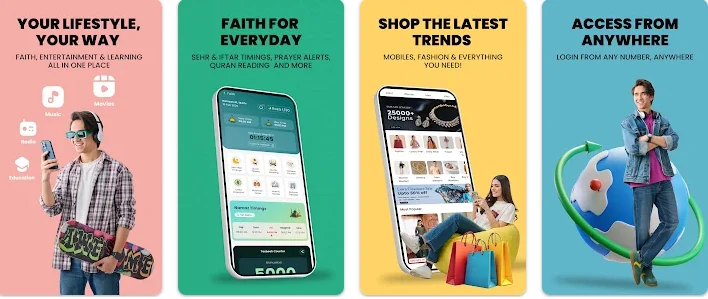
A mobile account app should make common tasks easy to locate. SIMOSA App is designed for smartphone use, giving customers a way to access supported account functions from their devices.
New users should spend a little time exploring the main screen and account sections. Look for balance information, packages, usage details, recharge options, and help or support features.
The layout may change as the developer releases updates. If a feature appears in a different place after an update, check the relevant menu rather than assuming the service has been removed.
How to Download and Install SIMOSA
The safest approach is to look for SIMOSA App through an official app distribution channel. Since the supplied listing describes version 3.3.4.2 as an XAPK file, users should understand the difference between installing from an app store and installing a package downloaded from another website.
1: Install Through the Official App Store
- Open Google Play Store on your Android phone.
- Search for SIMOSA.
- Check that the developer is identified as Jazz Pakistan.
- Review the app details and permissions.
- Tap the install option if the listing is available for your device.
- Wait for the installation to finish.
- Open the app and follow the on-screen instructions.
You can also visit the official Jazz Pakistan website to look for relevant app information or an official download link.
2: Installing an XAPK File
An XAPK file is a package format used by some third-party Android distribution websites. It may contain an APK along with additional app data or resources. Android does not always install XAPK files directly by tapping them.
If you are considering an XAPK download, follow these precautions:
- Confirm the app name and package details.
- Prefer an official source whenever possible.
- Check the file size and version against the publisher’s current information where possible.
- Scan the downloaded file with a reputable security tool.
- Do not install the file if the source or file integrity is uncertain.
- Avoid granting unrelated permissions or installing extra apps requested by an unfamiliar installer.
Enabling installation from unknown sources can increase security risks. If you enable this setting for a specific installation, disable it again afterward. For most users, the official app store is the simpler and safer choice.
How to Set Up and Use SIMOSA App
After installation, you can follow these general steps to get started. The exact screens may differ between app versions.
Open the Application
Find the SIMOSA App icon on your phone and open it. Make sure you have a working internet connection so the app can load its online services.
Follow the Login Instructions
Complete the sign-in or verification process offered by the app. Depending on the current process, this may involve your Jazz mobile number and an authentication step.
Enter your information only in the genuine application. Never share a one-time password or verification code with someone who contacts you unexpectedly.
Explore the Main Screen
Once you have access, review the available account information. Look for your balance, remaining resources, active packages, and other account-related options.
Take a moment to understand where important functions are located. This can make later tasks quicker.
Check Your Package
Open the relevant packages or usage section to see what services are available to your number. Check your current package’s validity and remaining resources before activating another offer.
Complete a Recharge or Payment
If you need to add credit or pay a bill, choose the supported option displayed in the app. Confirm the amount, mobile number, and payment details before authorizing the transaction.
Review the Result
After the process finishes, check the confirmation message and account status. Save any receipt or transaction reference, particularly when money is involved.
Benefits of Using the SIMOSA App
SIMOSA App can be helpful for Jazz customers who want to manage their mobile connection without relying entirely on traditional service methods.
Convenient account access: You can check supported account information from your smartphone.
Better usage awareness: Reviewing available data and minutes can help you understand how much of your package remains.
Easier package discovery: You can explore eligible offers and compare their terms before activating one.
Digital recharge options: Supported recharge methods can save a trip to a physical shop.
Bill management: Eligible postpaid users can access available billing information and payment services.
Access to promotions: The app may show offers associated with your number or account.
Less routine effort: Common account tasks can often be completed without visiting a service centre.
These benefits depend on the features available to your account, your internet connection, and the app’s current functionality.
Limitations You Should Know About
Although SIMOSA App can make mobile account management easier, it may not work perfectly in every situation.
An Internet Connection Is Usually Needed
Most online account functions require internet access. If your connection is weak or unavailable, the app may fail to load information or complete a transaction.
Some Offers Are Account-Specific
A package shown to one customer may not appear for another. Always review the offers available for your own number.
App Updates Can Change the Interface
A newer version may change menus, appearance, permissions, or available functions. Instructions based on an older version may not match your screen.
Login or Verification Can Sometimes Fail
Incorrect details, delayed verification messages, connectivity problems, or temporary service issues may prevent you from signing in. Check your connection and retry after a short wait.
Payments May Not Update Immediately
A successful payment may take some time to appear in the account. Keep the transaction reference and avoid repeating a payment immediately if you are unsure whether the first transaction succeeded.
Third-Party Downloads Require Extra Care
Downloading an app package from an unofficial website can expose your device to modified or harmful files. Verify the source before installing anything outside a trusted app store.
SIMOSA App vs. Traditional Account Management
SIMOSA App is designed to provide digital access to supported services. Traditional methods may still be useful when the app is unavailable or a customer needs assistance.
| Task | Using SIMOSA | Alternative |
|---|---|---|
| Check account details | View supported information in the app | Use an official supported account-checking method |
| Explore packages | Browse available offers | Check official Jazz channels |
| Recharge prepaid credit | Use available in-app options | Use a trusted recharge outlet or supported service |
| Pay a bill | Use available payment options | Use an authorized payment channel |
| Resolve account problems | Check available help options | Contact official Jazz customer support |
The best method depends on the task. For everyday checks, an app can be convenient; for a complex billing problem or a failed transaction, customer support may be necessary.
Tips for Using SIMOSA Safely
Because the app may involve account details and financial transactions, it is important to protect your information.
- Use trusted downloads: Install the app from Google Play or a download link verified through Jazz’s official website.
- Protect verification codes: Never share one-time passwords or login codes with strangers.
- Review payment details: Check the number and amount before confirming a transaction.
- Use secure connections: Avoid making sensitive payments over unfamiliar public Wi-Fi networks.
- Keep the app updated: Updates may include security improvements and bug fixes.
- Check permissions: Grant only permissions that make sense for the features you use.
- Keep receipts: Save payment confirmations until your balance or bill status is correct.
- Avoid suspicious offers: Do not trust messages promising unrealistic rewards in exchange for passwords or verification codes.
- Secure your phone: Use a screen lock and keep your operating system updated.
If you suspect unauthorized activity, use official Jazz support channels to secure your account and investigate the issue.
Common SIMOSA App Problems and Possible Solutions
SIMOSA App Is Not Opening
First, check your internet connection. Close and reopen the app, then restart your phone if the problem continues. You can also check whether an update is available.
If the app still fails, the issue may be related to a temporary service problem or device compatibility.
The App Is Not Showing the Correct Balance
Refresh the account screen and confirm that the correct number is being used. Some account changes may take time to appear.
If the displayed balance remains incorrect, check through an official Jazz account service or contact customer support.
The Verification Code Is Not Arriving
Confirm that your mobile number is correct and that your phone can receive messages. Wait briefly before requesting another code.
Avoid repeated requests in a short period, and never give a verification code to someone claiming they can fix the problem for you.
A Package Is Missing
Not every offer is available to every customer. Check the current package section and review any eligibility conditions.
If you believe a package should be available but cannot find it, contact official support for clarification.
A Payment Is Pending
Check your transaction history or payment confirmation, if available. Do not immediately repeat a payment if the first transaction may still be processing.
Keep the transaction ID and contact the payment provider or Jazz support if the issue remains unresolved.
The App Cannot Be Installed
Check your phone’s Android version, available storage, and compatibility with the listing. If you are using an XAPK file, remember that it may require a compatible installer.
Do not download a different or modified file simply to bypass an installation error. Look for a trusted official version first.
Who Should Use the SIMOSA App?
SIMOSA App is mainly useful for people who already use Jazz mobile services and want a convenient way to manage their accounts.
It may be suitable for:
- Prepaid customers who regularly check their balance.
- Postpaid customers who want to review available bill information.
- Mobile internet users who monitor their remaining data.
- People who want to compare eligible packages.
- Customers who prefer supported digital recharge and payment methods.
- Users who want to check promotions through an app rather than searching different websites.
However, the app may offer limited value to people who do not use Jazz services. Its usefulness also depends on whether the features you need are available for your particular number.
Final Words
The SIMOSA App provides Jazz customers in Pakistan with a convenient way to access supported mobile account services from a smartphone. It can help users check account information, review internet and call resources, explore packages, and access available recharge, bill-payment, and promotional options.
Its main advantage is convenience: routine mobile account tasks can be handled digitally without relying on a separate method for every service. At the same time, users should understand that available features can vary, transactions may occasionally be delayed, and the latest version details should always be verified through a trusted source.
If you use Jazz and want to manage your mobile connection more easily, SIMOSA App may be worth exploring. Download it from an official source, review its permissions, and confirm the details of every package or payment before proceeding.
FAQs
What is the SIMOSA App used for?
SIMOSA App is a Jazz Pakistan mobile self-service app designed to help customers manage supported account functions, view usage information, explore packages, and access available recharge, payment, and promotional services.
Is SIMOSA App free to download?
The supplied listing identifies SIMOSA App as free to download. However, mobile packages, recharges, bill payments, and other paid services may involve charges.
What is the latest version of SIMOSA?
The listing details provided for this article identify version 3.3.4.2. This should not be treated as a guaranteed current version because developers can release updates at any time. Check the official app store or Jazz website for the latest release.
What is the SIMOSA APK size?
The supplied listing reports a file size of 77.81 MB for version 3.3.4.2. The size may differ in later versions or between APK and XAPK distributions.
Which Android version does SIMOSA require?
The supplied listing states that Android 6.0 or higher is required. Check the current store listing to confirm compatibility with your phone.
Can I use SIMOSA App to check my Jazz balance?
The app is designed to provide supported account information, which may include balance details for eligible customers. The exact information available can depend on your account and app version.
Can I recharge my Jazz number through SIMOSA?
SIMOSA App may provide supported recharge options. Availability and payment methods can vary, so check the options shown inside the official app before completing a transaction.
Does SIMOSA support postpaid users?
The app is associated with Jazz account management and may offer supported services for eligible postpaid customers, including access to billing information. The available functions can differ by account type.
Why is SIMOSA not working on my phone?
Possible causes include a weak internet connection, an outdated app, device compatibility issues, a login problem, or temporary service interruptions. Try basic troubleshooting and contact official support if the issue continues.
Is it safe to download SIMOSA from a third-party website?
Third-party downloads carry additional risks because a file may be outdated, modified, or unsafe. The preferred option is to use Google Play or a download source verified through Jazz’s official website.
Can SIMOSA offers be different for different users?
Yes. Promotional offers and package availability may depend on your number, account type, eligibility, and the provider’s current promotions. Check the details displayed for your own account.
What should I do if a payment is deducted but my account does not update?
Keep the payment confirmation and transaction reference. Check the transaction status and contact the relevant payment provider or official Jazz support if the issue is not resolved. Avoid repeating the payment until you understand what happened.
Download links
How to install SIMOSA App Download Guide, Features, Jazz Account Management, Packages & More APK?
1. Tap the downloaded SIMOSA App Download Guide, Features, Jazz Account Management, Packages & More APK file.
2. Touch install.
3. Follow the steps on the screen.