Telegram Messenger 2026: What It Is, Features, Benefits, and How to Use It
Today
69.6 MB
12.10.0
Android 5.0
230k+
Description
Telegram Messenger is a popular messaging app designed for fast communication, file sharing, online communities, and more. Unlike a basic texting app, Telegram combines private messaging, large groups, broadcast channels, bots, multimedia sharing, and cross device synchronisation in one platform.
Whether you want to chat with friends, join an online community, share large files, follow a news channel, or build a business audience, Telegram offers tools for all of these purposes.
In this guide, we’ll explain what Telegram Messenger is, how it works, its main features, privacy options, advantages and disadvantages, and how to get started.
What Is Telegram Messenger?
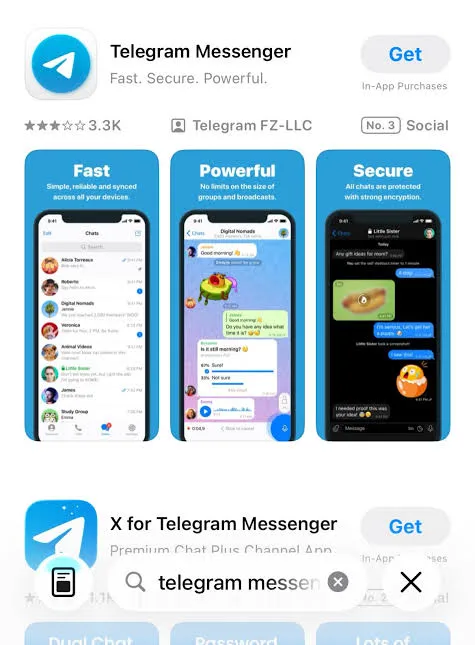
Telegram Messenger is a cloud-based messaging application focused on speed, communication, and privacy. It is available for Android, iPhone and iPad, Windows, macOS, Linux, and other platforms.
According to Telegram, the service has more than 1 billion active users and allows users to access their messages across multiple devices.
With Telegram, users can:
- Send text messages and voice messages
- Make voice and video calls
- Share photos, videos, and files
- Create large groups
- Follow public channels
- Use usernames instead of sharing a phone number in many situations
- Interact with bots and mini apps
- Synchronize chats across devices
- Use Secret Chats for end-to-end encrypted conversations
This combination makes Telegram more than just a traditional messaging application.
Why Is Telegram So Popular?
One reason Telegram has become popular is its combination of messaging, communities, content sharing, and automation.
For example, someone might use Telegram to chat privately with a friend, join a 100,000-member community, follow several channels, download documents, and use a bot all from the same application.
Telegram also emphasizes speed and cross-platform access. Your regular cloud chats can be accessed from multiple devices, so you don’t have to depend on a single phone for your conversation history.
Key Features of Telegram Messenger
1. Fast Messaging
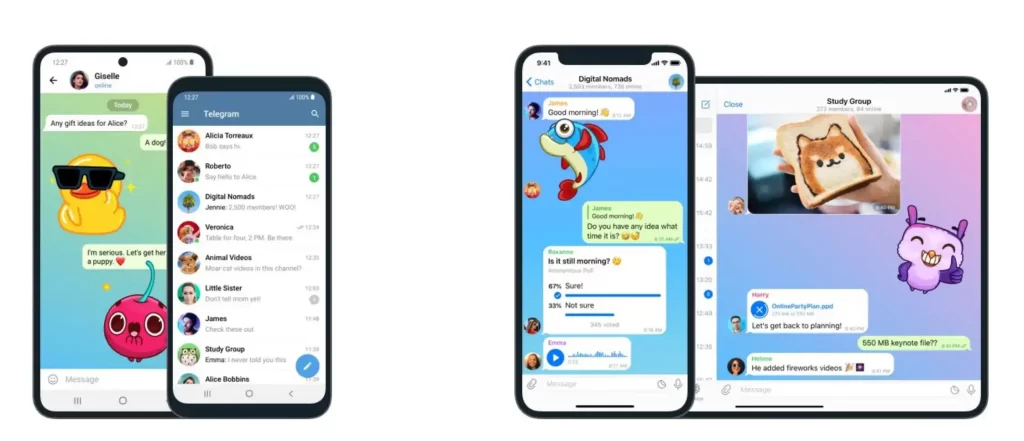
Telegram is built around quick communication. You can send text, photos, videos, documents, voice messages, stickers, and other types of media.
Because Telegram stores regular cloud chats in its cloud infrastructure, your messages can synchronize between supported devices.
2. Large Telegram Groups
Telegram groups are useful for communities, teams, classes, organizations, and interest-based discussions.
A Telegram group can support up to 200,000 members, making it suitable for communities that are much larger than a typical private family or friends’ group.
Group administrators can also use moderation features such as:
- Member permissions
- Pinned messages
- Administrators and custom admin privileges
- Message deletion
- Anti-spam tools
- Topics for organizing conversations
- Bots and automation
This makes Telegram groups useful for both casual communities and large online organizations.
3. Telegram Channels
Telegram channels are different from groups.
A Telegram group is primarily designed for conversations and community interaction, while a Telegram channel is designed for broadcasting information to an audience.
Channels can have an unlimited number of subscribers. Posts appear under the channel’s name rather than the individual administrator’s personal name.
Channels are commonly used for:
- News and updates
- Educational content
- Business announcements
- Technology communities
- Entertainment
- Product updates
- Personal brands
- Online publications
If your main goal is to publish information to a large audience, a Telegram channel can be more appropriate than a group.
4. File Sharing
Telegram is also widely used for sharing files.
Users can send documents, images, videos, audio files, and other file types through chats and groups. Telegram’s current FAQ states that files can be shared up to 2 GB each on the standard service and up to 4 GB with Telegram Premium.
This can make Telegram useful when ordinary messaging apps are inconvenient for transferring larger files.
5. Usernames and Privacy
Telegram allows users to communicate through usernames in situations where they don’t want to publicly share their phone number.
Your username can allow another person to find and contact you without necessarily knowing your phone number. Telegram also provides privacy settings that control who can see different account details.
However, users should still review their privacy settings rather than assuming that everything is private automatically.
Is Telegram Messenger Safe?
This is one of the most common questions about Telegram.
The short answer is: Telegram provides several security and privacy features, but not every Telegram conversation uses end-to-end encryption by default.
Telegram distinguishes between regular Cloud Chats and Secret Chats.
Regular cloud chats use client-server/server-client encryption and are stored in Telegram’s cloud. Secret Chats, on the other hand, use end-to-end encryption and are designed so that only the participants can read the messages.
What Are Telegram Secret Chats?
Secret Chats are intended for conversations that require an additional level of privacy.
They offer features including:
- End-to-end encryption
- Self-destructing messages
- No forwarding of messages
- Device-specific conversations
Secret Chats are not stored in Telegram’s cloud and are only available on the devices where the Secret Chat was created. T
For sensitive conversations, understanding the difference between regular Telegram chats and Secret Chats is important.
Telegram Bots: What Are They?
One feature that makes Telegram different from many messaging apps is its bot ecosystem.
Telegram bots are automated accounts that can perform tasks or provide services inside Telegram.
Bots can be used for things such as:
- Customer support
- Automated notifications
- Games
- Polls and quizzes
- Productivity tools
- Search
- Payments
- Business automation
- Mini apps
- Community management
Telegram’s official bot platform supports commands, interactive buttons, mini apps, payments, AI-related features, and many other integrations.
However, you should treat third-party bots carefully. When you interact with a bot, information may be shared with the developer operating that bot. Telegram itself recommends treating bots like strangers and avoiding the sharing of passwords, login codes, or financial information.
Telegram Messenger for Business
Telegram can also be useful for businesses and creators.
Businesses can use Telegram to build communities, publish announcements, communicate with customers, automate tasks, and distribute content through channels.
For example, a small business might create a Telegram channel for product announcements while using a bot to answer common customer questions.
Creators can also use channels to publish updates directly to subscribers without relying entirely on traditional social media algorithms.
Telegram Messenger on Multiple Devices
One of Telegram’s convenient features is cross-device synchronization.
You can use Telegram on your smartphone and also access your regular cloud chats from desktop or other supported devices. Messages synchronize across devices, which makes Telegram practical for people who regularly switch between a phone and computer.
Telegram provides official applications for Android, iPhone/iPad, Windows, macOS, and Linux.
How to Create a Telegram Account
Getting started with Telegram is relatively simple.
Step 1: Download Telegram
Download the official Telegram application form trusty site for your device.
Step 2: Enter Your Phone Number
Open the application and enter your phone number.
Telegram will use a verification process to confirm your account.
Step 3: Set Up Your Profile
Add your name and, if you want, a profile picture and username.
Step 4: Adjust Privacy Settings
Before actively using Telegram, it’s a good idea to check the privacy and security settings.
Pay particular attention to:
- Phone number visibility
- Who can contact you
- Two-step verification
- Passkeys
- Active sessions
- Profile visibility
Step 5: Start Messaging
You can now message contacts, search for public usernames, join groups, subscribe to channels, and explore Telegram’s features.
Telegram Messenger vs Traditional Messaging Apps
Telegram is different from a basic SMS messenger because it provides much more than person-to-person texting.
| Feature | Telegram Messenger |
|---|---|
| Text messaging | Yes |
| Voice messages | Yes |
| Voice/video calls | Yes |
| Large groups | Up to 200,000 members |
| Channels | Yes |
| Bots | Yes |
| File sharing | Yes |
| Multi-device synchronization | Yes |
| Secret Chats | Yes |
| Public usernames | Yes |
| Mini apps | Yes |
The biggest difference is the breadth of Telegram’s ecosystem. It combines messaging with large communities, broadcasting, automation, and content sharing.
Advantages of Telegram Messenger
Telegram has several advantages that make it attractive to users.
Large communities
Groups can support very large communities, while channels can reach unlimited subscribers.
Cross-platform access
Regular cloud chats can be accessed across multiple supported devices.
Powerful channels
Creators, organizations, and businesses can broadcast content to large audiences.
Useful bots
Bots can automate tasks and add functionality to Telegram.
Large file sharing
Telegram supports sharing large files compared with many traditional messaging services.
Privacy controls
Telegram offers various privacy and security settings, including Secret Chats and two-step verification. Telegram
Disadvantages of Telegram Messenger
Telegram isn’t perfect, and there are a few things users should understand.
End-to-end encryption isn’t the default for regular chats
This is perhaps the most important point. Regular Telegram Cloud Chats are encrypted, but they are not the same as Secret Chats, which use end-to-end encryption.
Third-party bots require caution
Bots can provide useful services, but interacting with them can involve sharing information with their developers.
Large public communities can contain spam
Because Telegram supports enormous communities and public channels, users may encounter spam, scams, misleading content, or malicious links.
The safest approach is to avoid unknown links, never share verification codes or passwords, and use Telegram’s privacy and security controls.
Is Telegram Free?
Telegram offers a free version with a wide range of messaging and community features.
There is also Telegram Premium, which provides additional features for subscribers.
For many casual users, the free version is enough for messaging, group participation, channels, file sharing, and everyday communication.
What Makes Telegram Different?
Telegram’s biggest strength isn’t just messaging.
It is the combination of messaging, communities, channels, file sharing, bots, automation, multi device access.
A person can use Telegram simply as a messaging app, while another user can use it as a community platform, publishing tool, customer-support system, or automation platform.
That flexibility is a major reason Telegram has developed into a broader communication ecosystem.
Frequently Asked Questions About Telegram Messenger
Is Telegram Messenger free?
Yes. Telegram offers a free version that provides core messaging and communication features. Telegram also offers an optional Premium subscription with additional capabilities.
Is Telegram better than WhatsApp?
It depends on what you need. Telegram stands out for large groups, channels, bots, large file sharing, and multi-device functionality. WhatsApp may be more convenient if most of your contacts already use it.
Is Telegram completely private?
No messaging platform should be described as completely private. Telegram provides multiple privacy and security features, but regular Cloud Chats are different from end-to-end encrypted Secret Chats.
Can I use Telegram without sharing my phone number?
Telegram accounts are registered using a phone number, but privacy settings and usernames can allow you to communicate with other users without making your phone number visible to them in many circumstances.
What is a Telegram channel?
A Telegram channel is a broadcasting tool that allows administrators to publish messages to an audience. Channels can have unlimited subscribers.
What is a Telegram group?
A Telegram group is designed for community conversations and interaction. Groups can support up to 200,000 members and include extensive moderation tools.
What are Telegram bots?
Telegram bots are automated accounts that can provide services, respond to commands, automate tasks, and power features such as mini apps and business tools.
Final Thoughts
Telegram Messenger has grown far beyond a simple chat application. Its combination of private messaging, large groups, channels, file sharing, bots, and cross-device synchronization makes it a flexible communication platform for everyday users, communities, creators, and businesses.
If you mainly need simple messaging, Telegram can handle that. But if you want to build or join large communities, broadcast content, automate tasks, or share larger files, its additional features become even more useful.
The most important thing to remember is that Telegram’s regular cloud chats and Secret Chats provide different security models. Understanding that distinction and using strong privacy settings is essential if privacy is a major concern.
For most users, Telegram’s appeal comes down to one thing: it gives you a messaging app that can also function as a community, publishing, file-sharing, and automation platform.
Quick Summary
Telegram Messenger is best known for:
- Fast and flexible messaging
- Large groups and unlimited-subscriber channels
- Multi-device synchronization
- Large file sharing
- Bots and mini apps
- Privacy and security controls
- Secret Chats with end-to-end encryption
- Tools for communities, creators, and businesses
As Telegram continues adding new features, it is increasingly becoming more than a messenger it’s a complete communication ecosystem.
Download links
How to install Telegram Messenger 2026: What It Is, Features, Benefits, and How to Use It APK?
1. Tap the downloaded Telegram Messenger 2026: What It Is, Features, Benefits, and How to Use It APK file.
2. Touch install.
3. Follow the steps on the screen.